ROLE
Stakeholder interviews, usability testing, visual design and application development
INDUSTRY / PRODUCT
Enterprise SaaS
Workflow Design
COMPANY
Johnson Controls International (JCI)
USERS IMPACTED
2000+ employees
TIMELINE
~2 months end-to-end
30-day build sprint
OVERVIEW
When the UAE went into COVID lockdown, Johnson Controls employees could only enter an office with manager sign-off — and every request ran on PDF forms and email chains. I led design and development of a cross-platform app that replaced the whole thing, learning Microsoft Power Platform from scratch to build it.
SOLUTION PREVIEW
PROBLEM
Employees worked from home and could only come in once their Line Manager and HR Manager signed off and a Facility Manager assigned a socially-distanced seat. All of it ran on PDFs and email — slow, opaque, and a real security risk with sensitive health data sitting in inboxes no one could track.
"I feel like I spend half my day just chasing down approvals. I have no idea who has approved what, and my team is getting antsy. We need a system that just works." — Manager, early research
RESEARCH
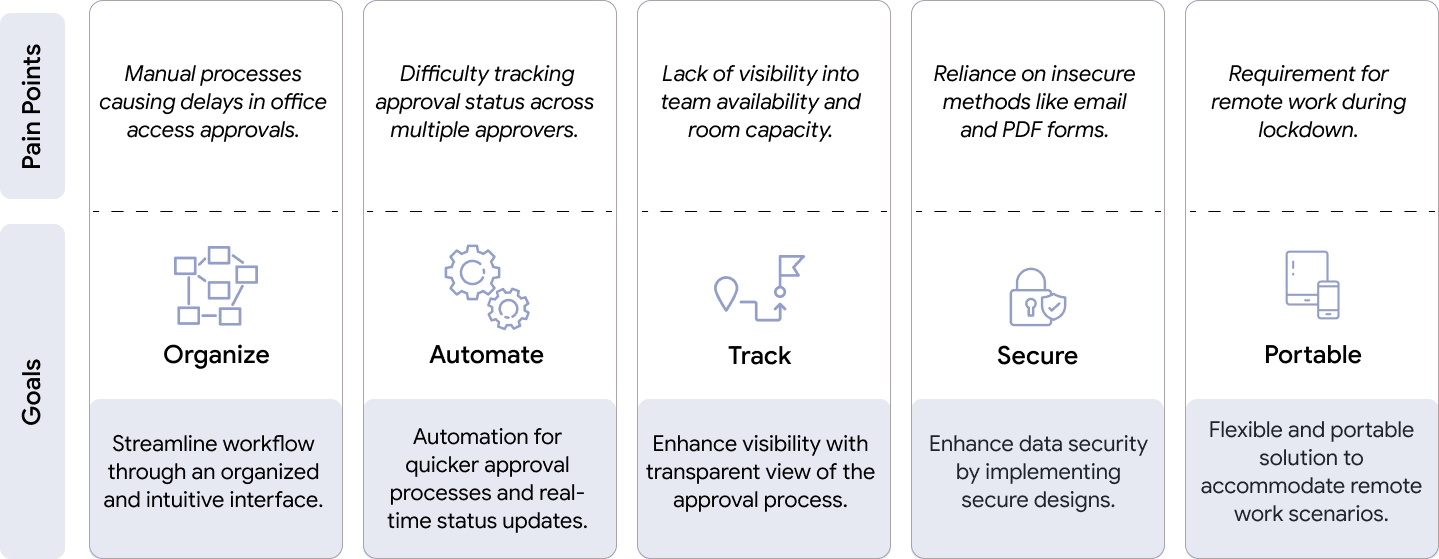
Across 10+ interviews with Line Managers, Facility Managers, and HR Heads, the same thing surfaced: nobody could see anything. No centralized tracking, no visibility into room capacity or who'd be in the building, security concerns throughout — and sales teams needed in-person client time the manual system couldn't prioritize. I mapped each pain point straight to a design goal, so every frustration I heard had to answer to something I'd build.
STOPGAP
Before building anything proper, I stood up a simple Microsoft Forms version so employees could stop re-filling PDFs for every request. It bought the team time — and proved why the real thing mattered: the Forms data piled into a place that was hard to structure and open to anyone in the company. The temporary fix made the case for the permanent one.
CONSTRAINT
The company already ran on Microsoft, so Power Platform was the mandate, not the choice. As the person accountable for the build, I learned PowerApps, Power Automate, and Power BI from the ground up — and with no runway, designed and developed at the same time. Instead of fighting the platform for custom polish, I leaned into what it did reliably: automation, notifications, list-based data, and native hooks into Teams, SharePoint, and Outlook.
WORKFLOW
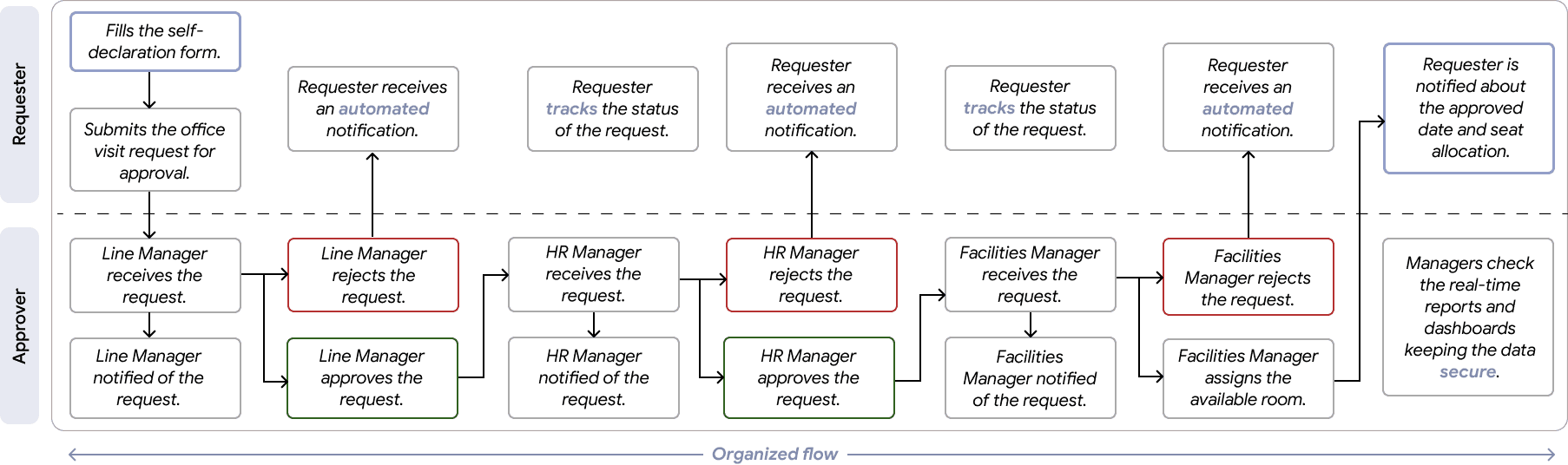
A request wasn't one approval, it was a relay: self-declaration → Line Manager → HR Manager → Facility Manager seat assignment, with the requester left in the dark the whole way. Diagramming the full flow first meant the automation I built later removed handoffs instead of just digitizing them.
DECISION
A key trade-off was choosing a simple, list-based approval view instead of a more visual calendar or seating map. While a richer visualization could have improved spatial awareness, it would have slowed development and increased failure risk under tight timelines. Given the urgency, we optimized for reliability and adoption first, with the option to layer complexity later. I tested rough screens with my analyst and IT director, then optimized hard for reliability and adoption — layering richer features in only once the core held.
SOLUTION
A centralized dashboard replaced the inbox sprawl, automated flows pushed status updates over email and Teams, and moving everything out of PDFs made the whole process auditable and secure. Because it worked on mobile, people could manage access from home — which was the entire point.
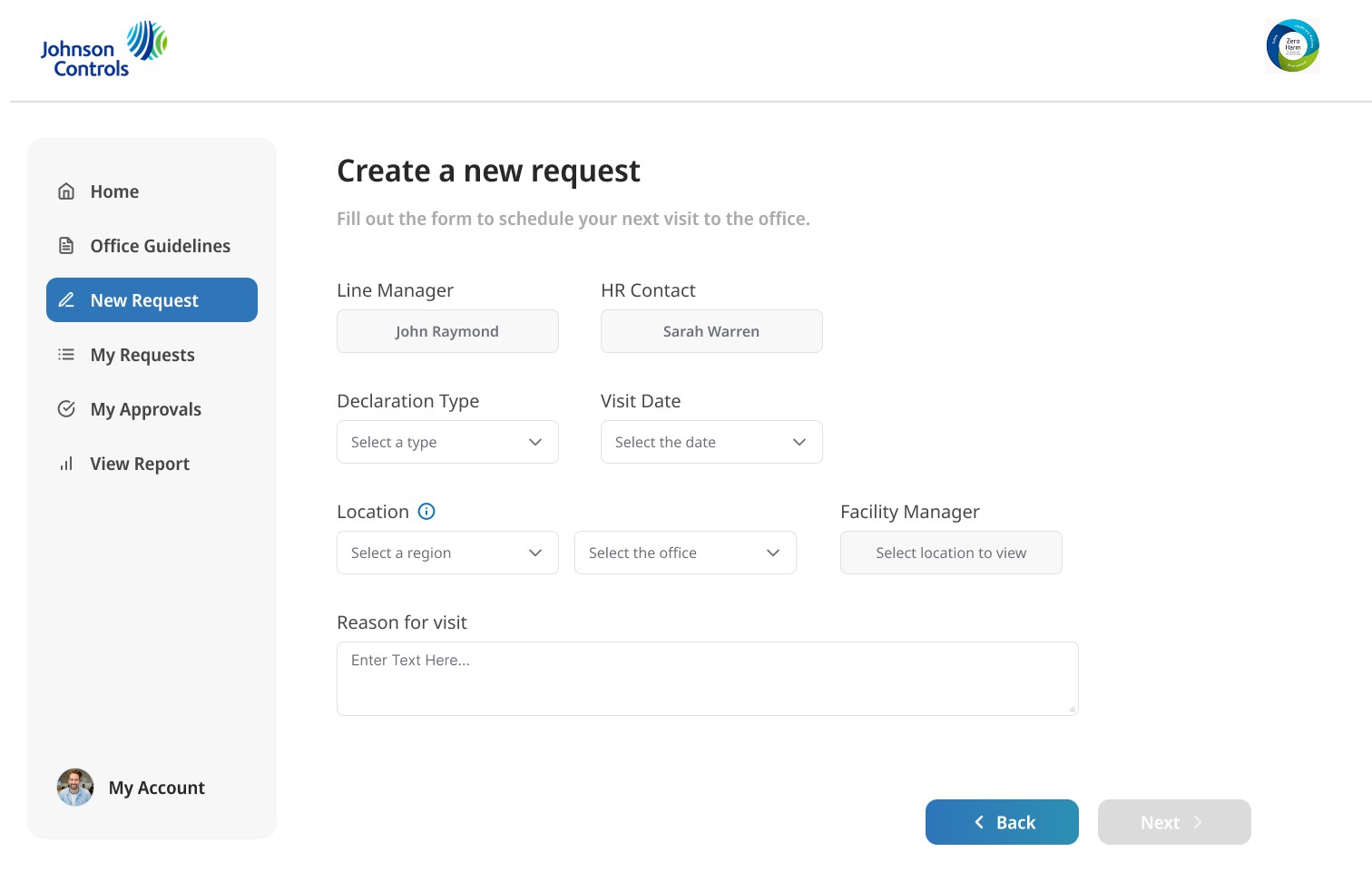
One form replaced the PDF chain: line manager, HR contact, declaration type, visit date, location, and facility manager, all in one place.
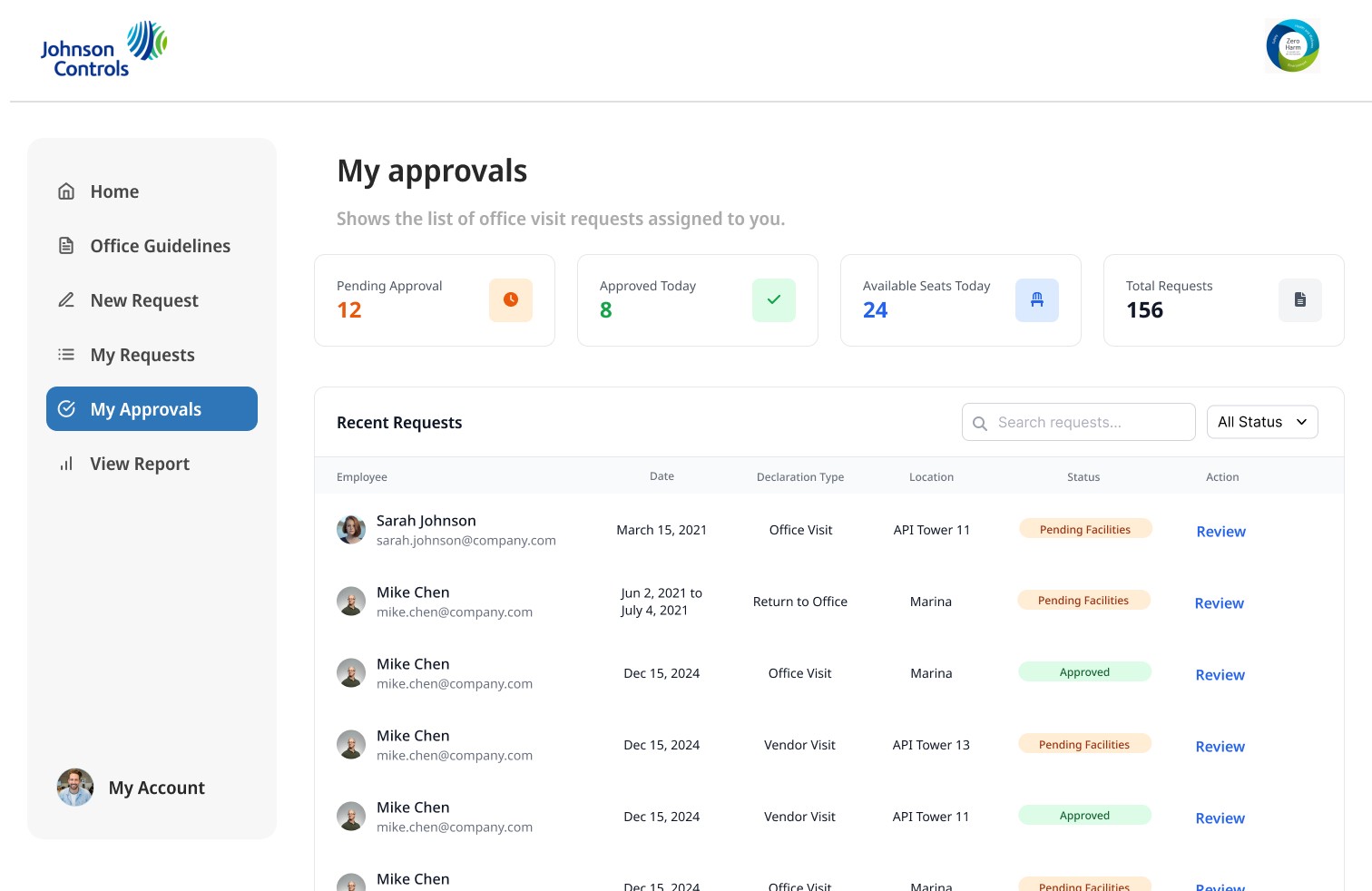
Approvers see every request and its real-time status at a glance — no more inbox archaeology.
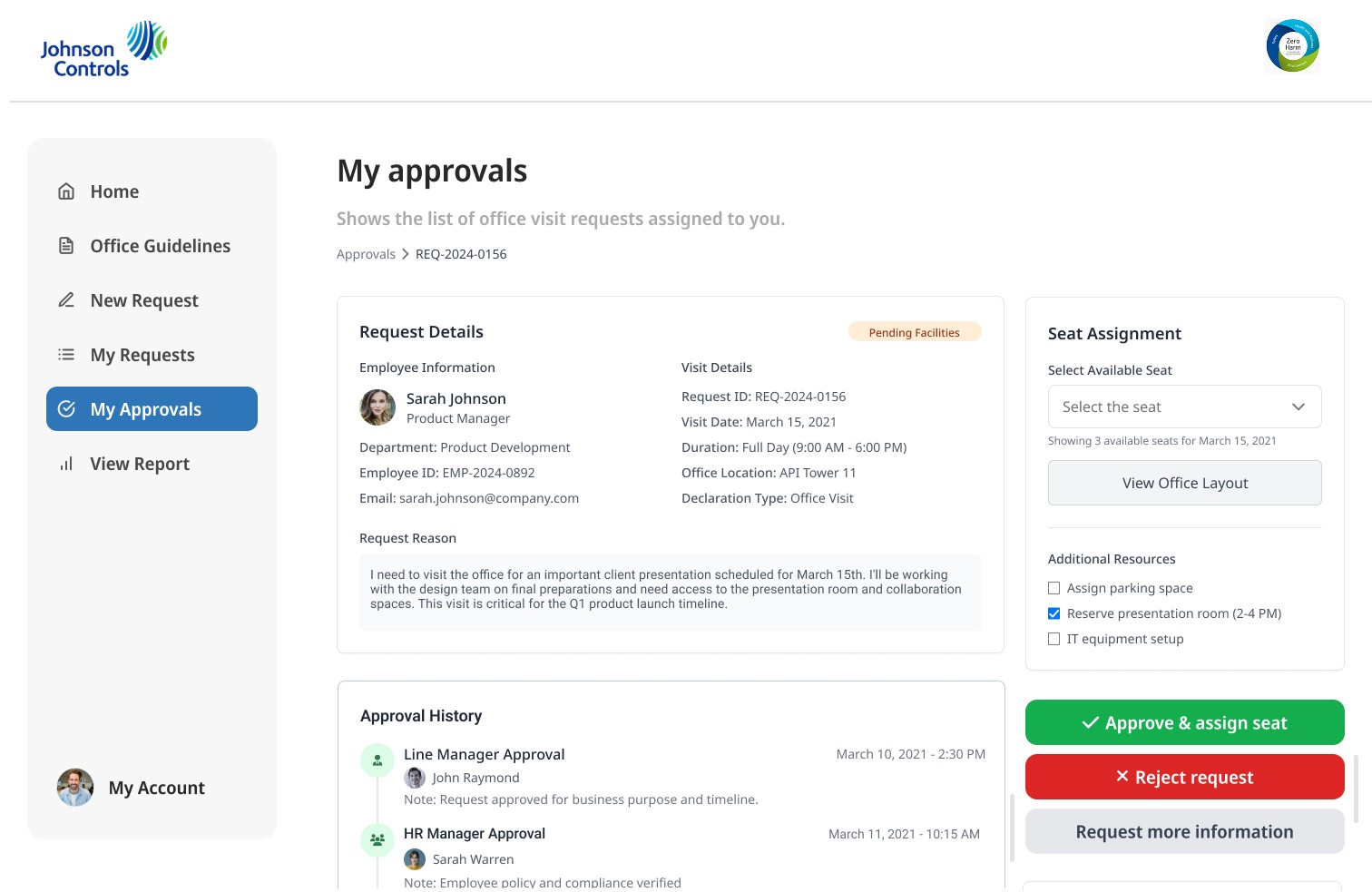
Open any request for full details, seat or meeting-room assignment, and the complete approval history — with approve, reject, or request-more-info in a single tap.
IMPACT
A final round of testing with a wider group surfaced real edge cases, so I added the ability to reassign an approver, assign a specific seat for employee visits, and book a meeting room for customer visits. "Journey To Our New Normal" went live and 200+ employees adopted it immediately, backed by manuals and training I built for 50+ staff, and on the strength of that it rolled out to 14 offices across the Middle East, Africa, and Latin America in the first month.
"This is a game-changer. I can now request office access in a matter of seconds, and I always know where my request is in the process. It's taken a huge weight off my shoulders." — Employee, post-launch
REFLECTION
This is the project where design and engineering collapsed into one job — I learned an entire platform under deadline and shipped on it, and the thing I'm proudest of is everything I left out. Under that kind of pressure the temptation is to prove yourself with something sophisticated, but every feature I cut and every week I saved by shipping a stopgap is the reason people actually used it. Designing for clarity, speed, and structure, especially under constraints, often creates more value than feature-rich experiences.